Guide
How to use CosMeal
Log what you eat, plan meals, shop, and see how your week went. In each section, the numbers in the steps match the numbers in the pictures.
Your Today page
Today is the first page you see.
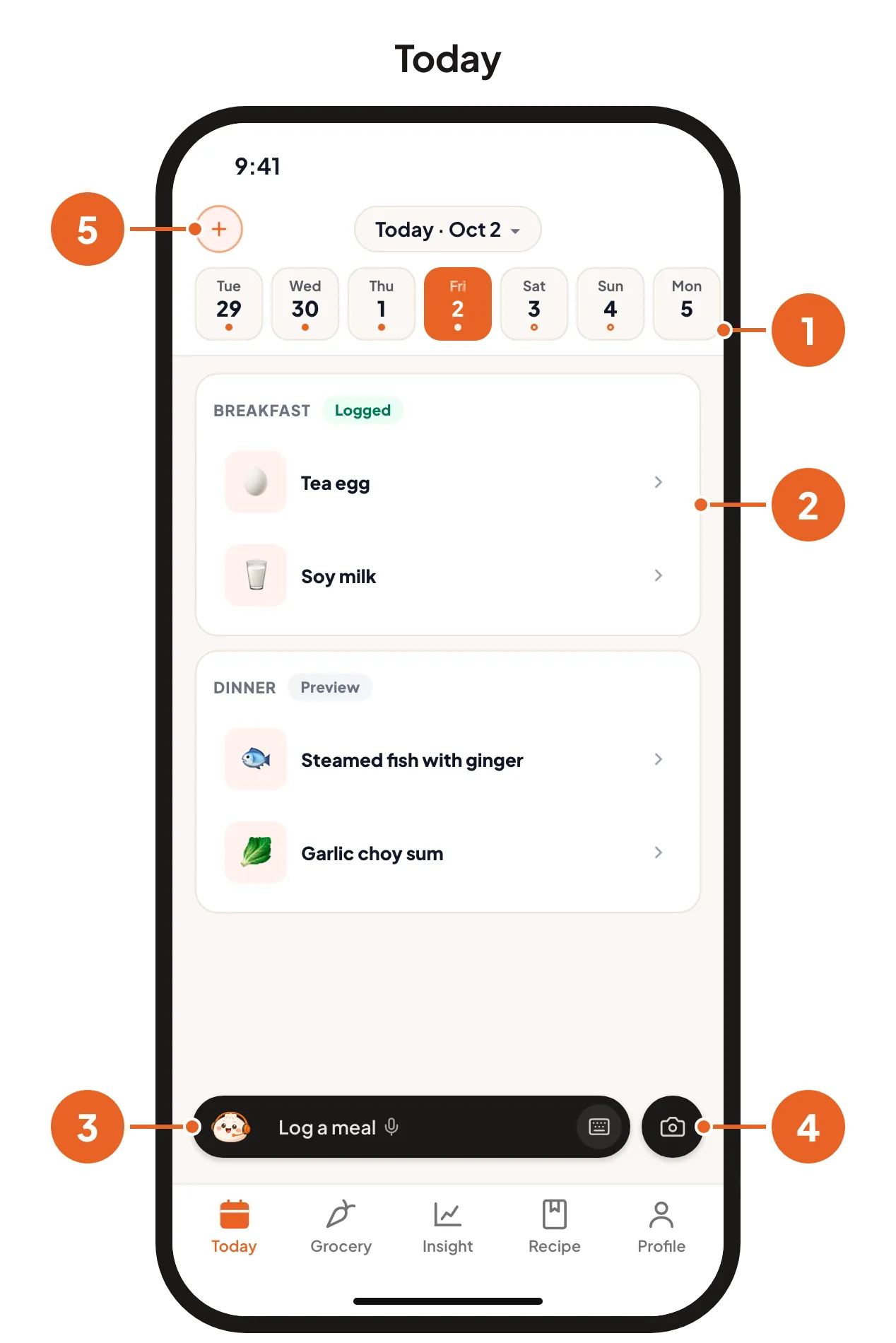
The date strip. Tap a day to see its meals. Tap the date at the top to open a calendar.
Your meals. Each meal you planned or logged appears as a card. A green Logged label means you have logged it.
The Baobao bar. Baobao is the app's assistant. Tap the bar to ask it anything, log a meal or plan a day.
The camera button. Tap it to log a meal with a photo.
The + button. Tap it to plan meals ahead.
The tabs at the bottom open the other pages: Today, Grocery, Insight, Recipe and Profile.
Log a meal with a photo
CosMeal reads your meal from a photo and estimates its carbs, protein, fat and calories. The result is an estimate, shown as a range.
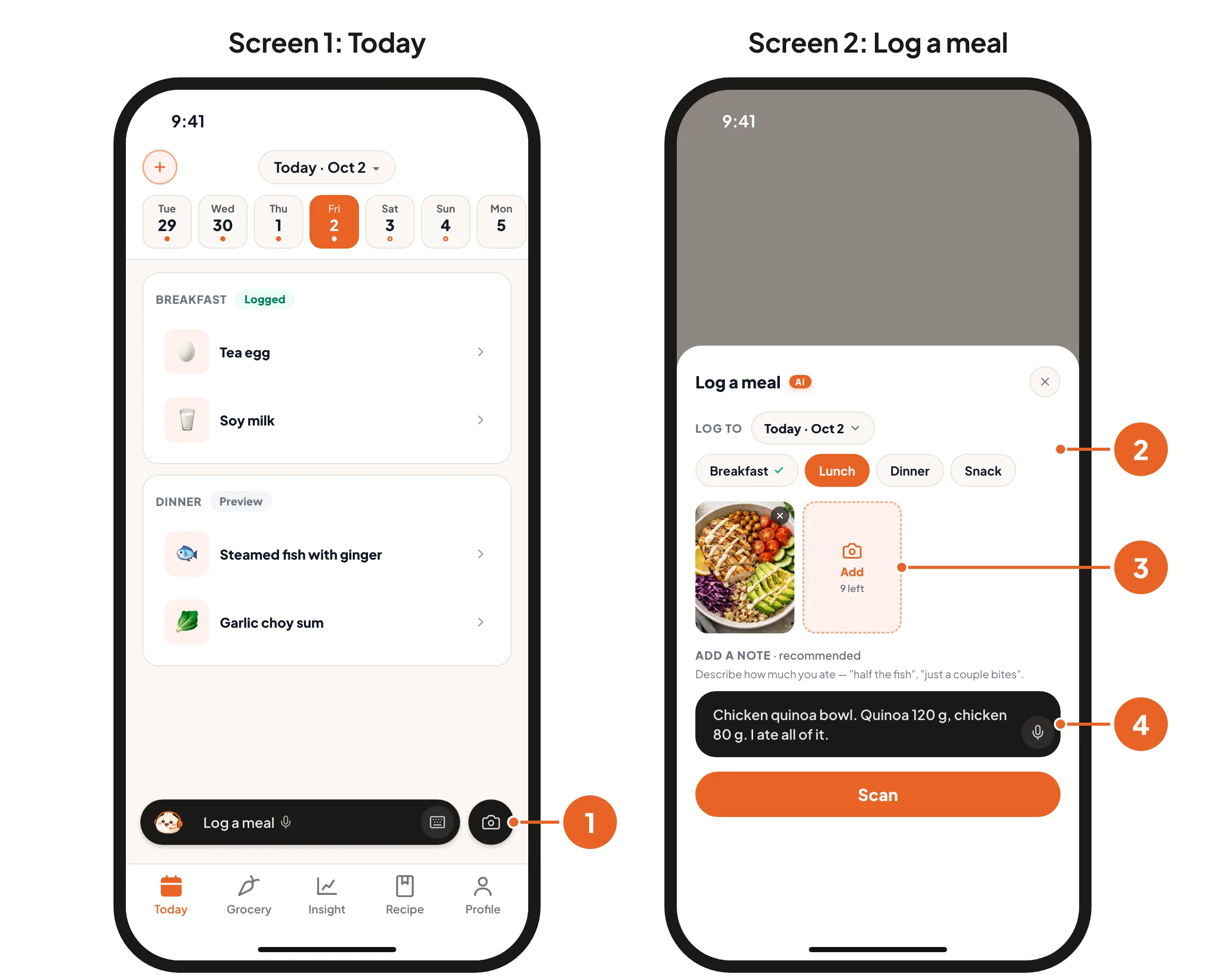
Open the camera. On the Today page, tap the camera button at the bottom right.
Pick the meal. Under Log to, choose Breakfast, Lunch, Dinner or Snack.
Take a clear photo. Keep the whole plate in the frame, in good light. Take one photo of the whole meal, or one photo per dish, up to ten. For packaged food, take a photo of the nutrition label.
Add a note, then tap Scan. Say what the food is and how much you ate. You can type it or say it. The more you tell the app, the better the estimate:Good: name the food, for example "brown rice and chicken".Better: say how much, for example "half a bowl of brown rice, two eggs".Best: give the weight, for example "brown rice 120 g, chicken 60 g". This gives the most accurate numbers.
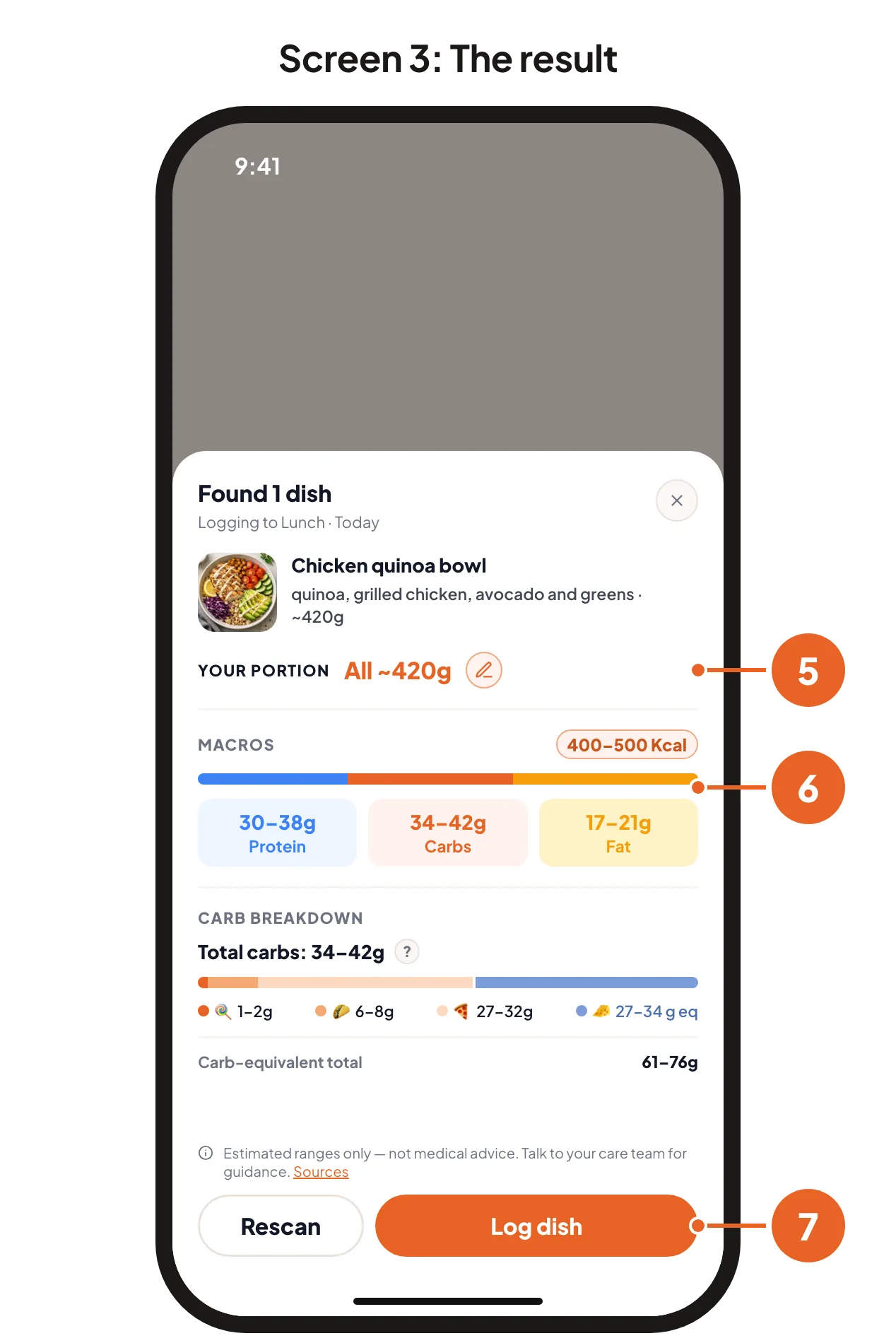
Check your portion. The app shows how much it thinks you ate. Tap the pencil if you ate more or less.
Read the numbers. Carbs, protein, fat and calories are shown as a range, for example 34 to 42 g of carbs.
Tap Log dish. If the app named a food wrongly, tap Rescan, correct the note and scan again. Your photos and note are kept.
How accurate is the estimate?
The more you tell the app, the closer the estimate. A note about what the food is and how much you ate helps more than anything else.
| What you give | Example | Accuracy |
|---|---|---|
| Photo only | No note | 69 |
| Photo + food names | "Chicken, rice and broccoli" | 74 |
| Photo + everyday amounts | "Half a bowl of rice, two eggs" | 83 |
| Photo + weights | "Rice 120 g, chicken 60 g" | 87 |
| Nutrition label photo | The app copies the printed numbers | 100 |
Accuracy is a score out of 100. 100 means the estimate matches the weighed food exactly. 80 means it is 20% off.
What to expect
- A photo does not show the weight of the food, or the oil, sugar and sauce in it. No app can read what the photo does not show.
- If a number looks wrong, add more detail to the note and scan again. Weigh the food when the number matters most.
Where the numbers come from
Accuracy was measured on 280 weighed cafeteria plates from the Nutrition5k dataset, selected and checked by the CosMeal team. Those photos were taken from above in a cafeteria. Your own photos may be read better or worse. The pictures on this page are examples: your numbers will differ.
Talk or type
Three places in the app take your words: the Baobao bar at the bottom of the screen, the Add a note bar when you log a meal with a photo, and the Anything else step when you plan meals. Each one works the same way:
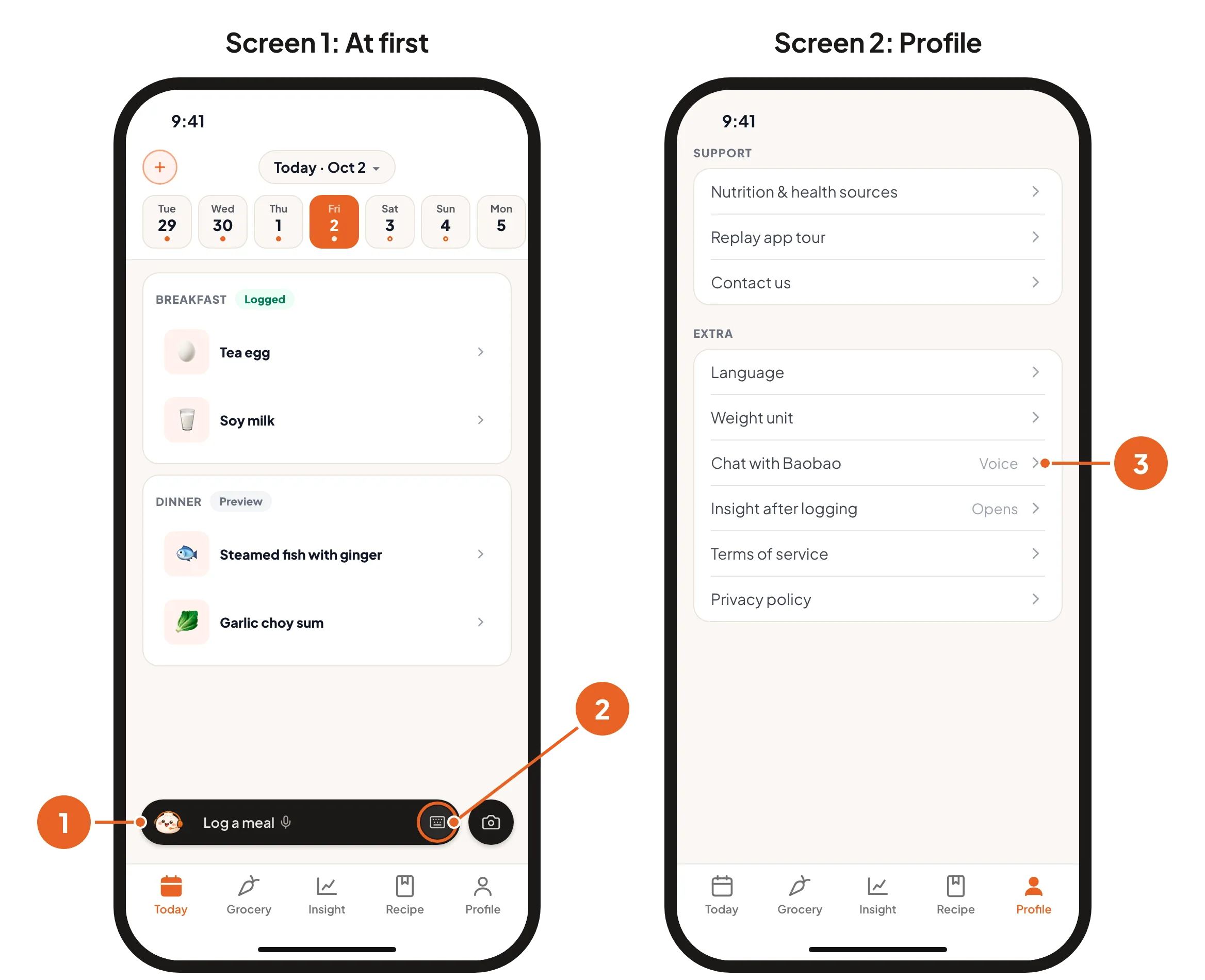
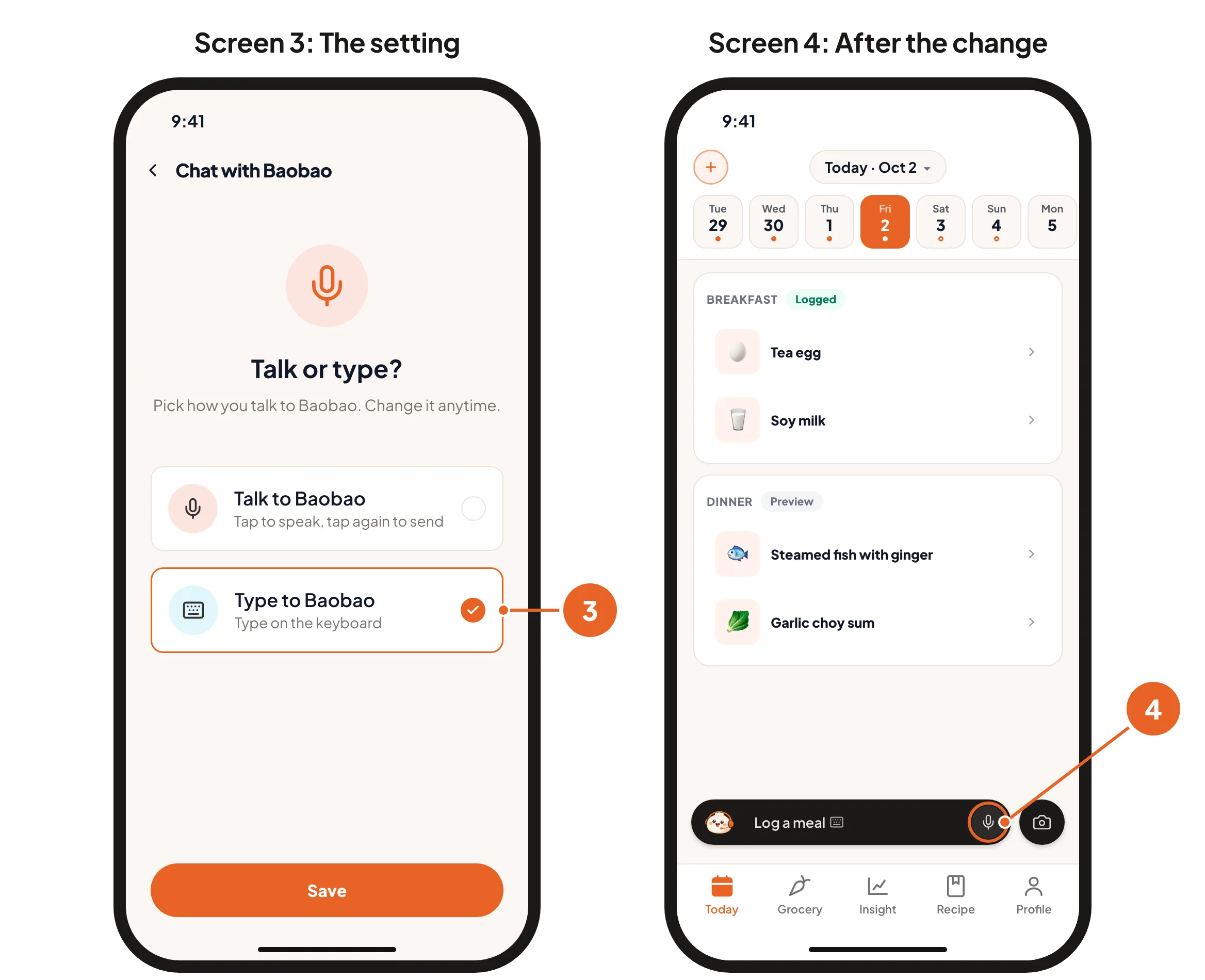
At first, tapping the bar starts the microphone. Say what you want, then tap again to finish.
To type instead, tap the small round keyboard button at the right end of the bar. The keyboard opens.
To make typing the default, go to Profile, tap Chat with Baobao and choose Type to Baobao. This changes all three bars.
After that, tapping the bar opens the keyboard, and the small round button becomes a microphone button. Tap it when you want to speak instead.
You can change this back at any time in the same place.
Log or fix a meal by typing
You never have to use the microphone. To type, see "Talk or type" above.
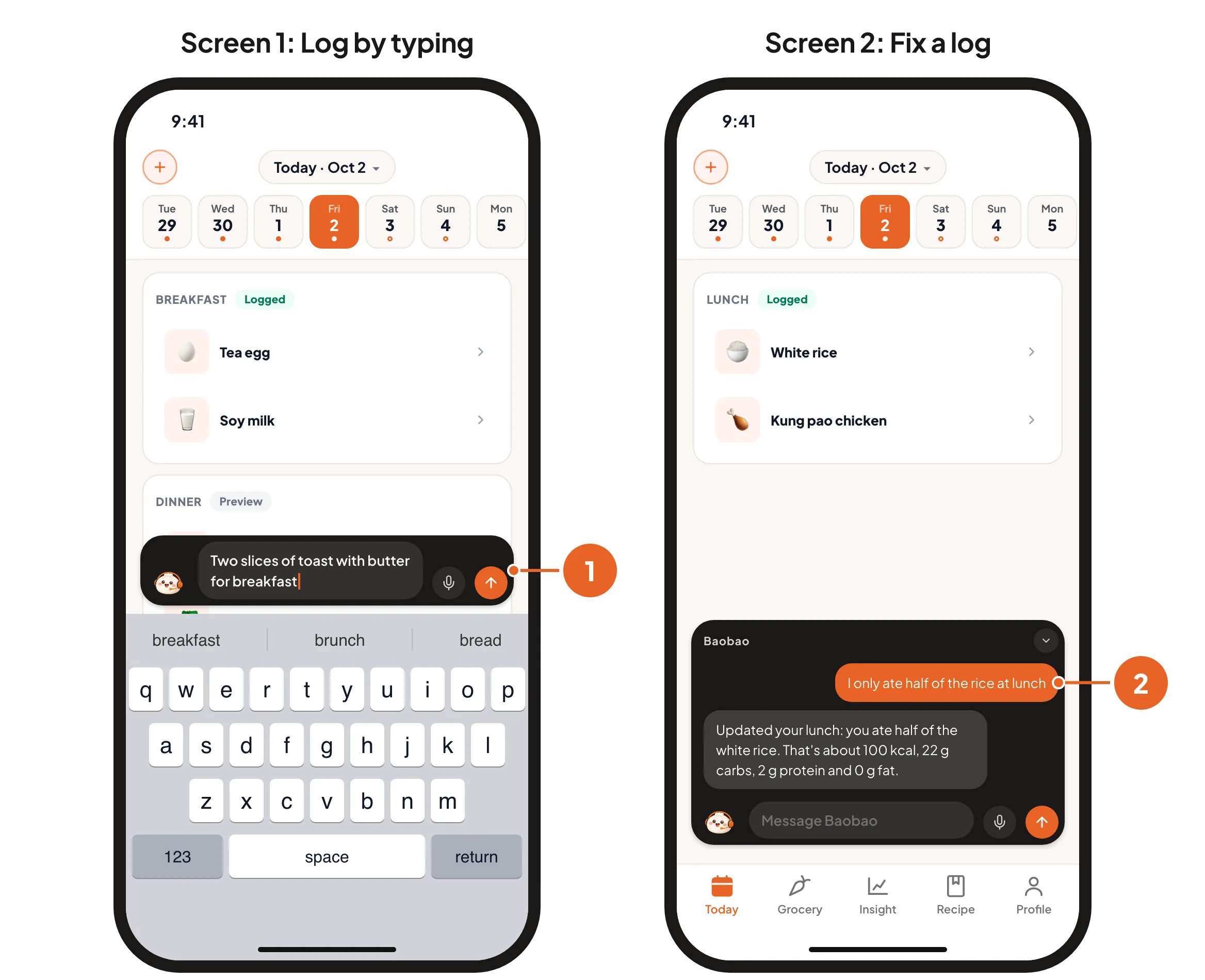
Log a meal without a photo. Tap the Baobao bar and type what you ate, for example "two slices of toast with butter for breakfast". Baobao logs it and estimates the numbers.
Fix a meal you already logged. A logged meal cannot be edited on its own page. Tell Baobao instead, for example "I only ate half of the rice at lunch" or "that was brown rice, not white". Baobao updates the log.
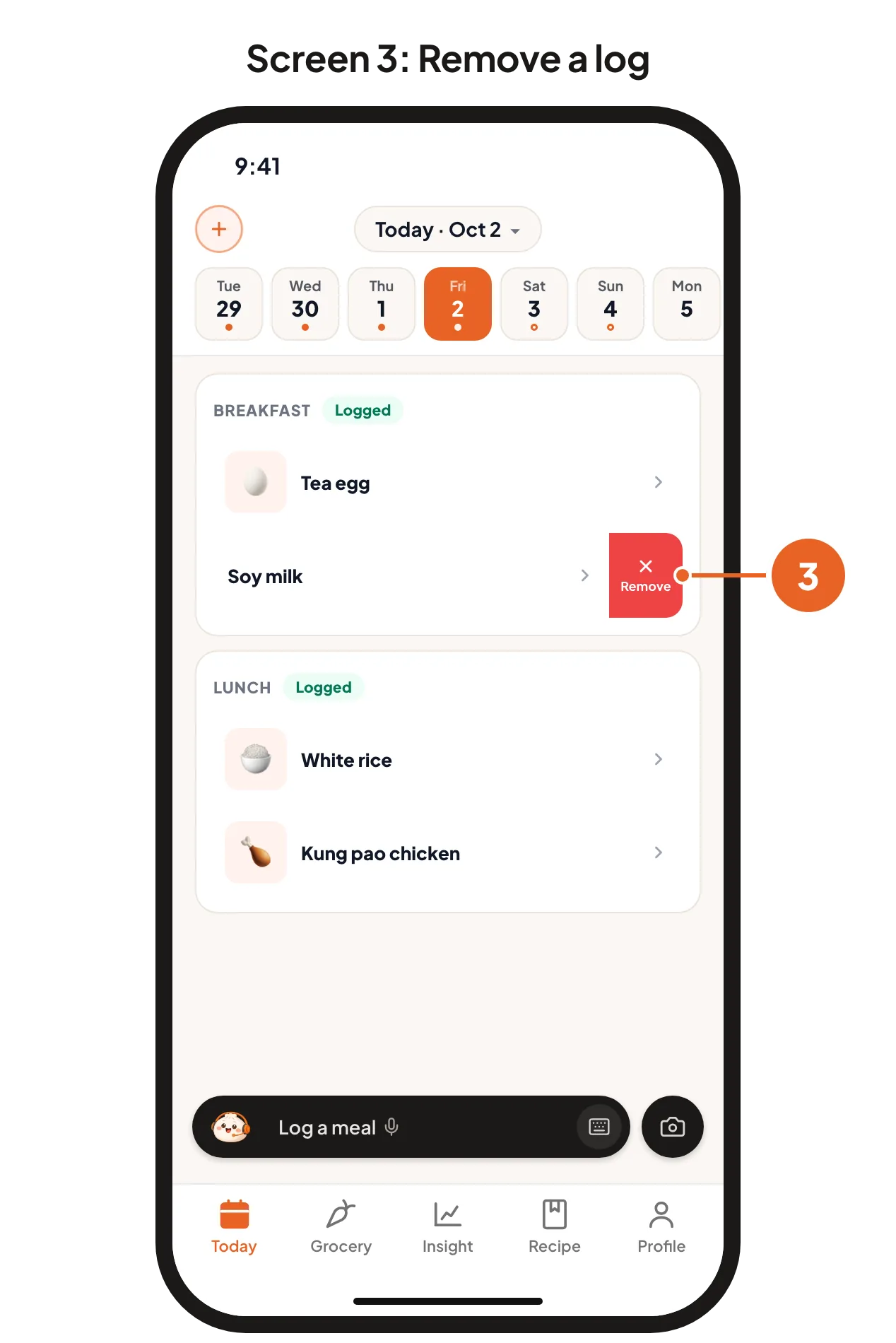
Remove a logged meal. On the Today page, slide the dish to the left and tap Remove.
Plan meals ahead
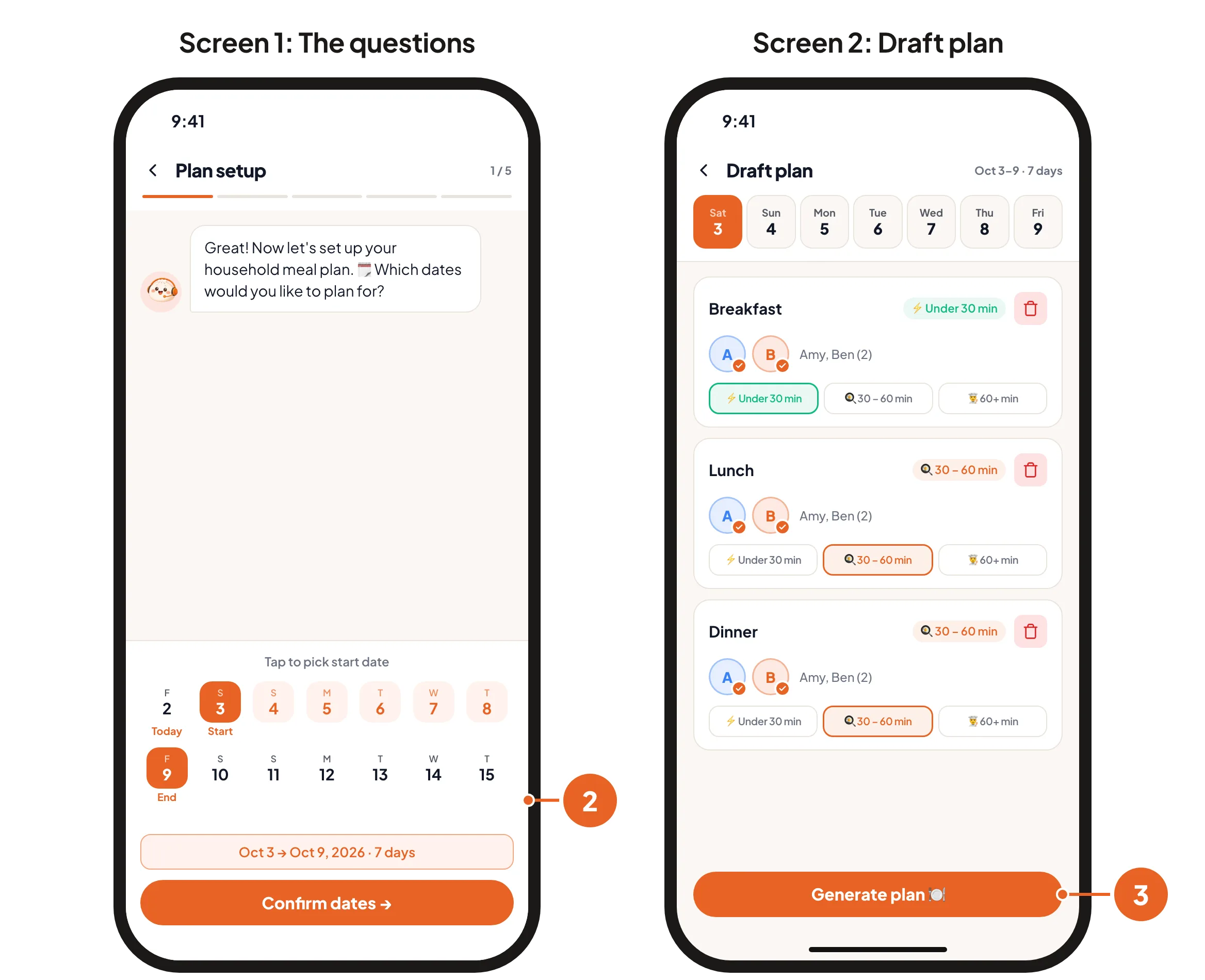
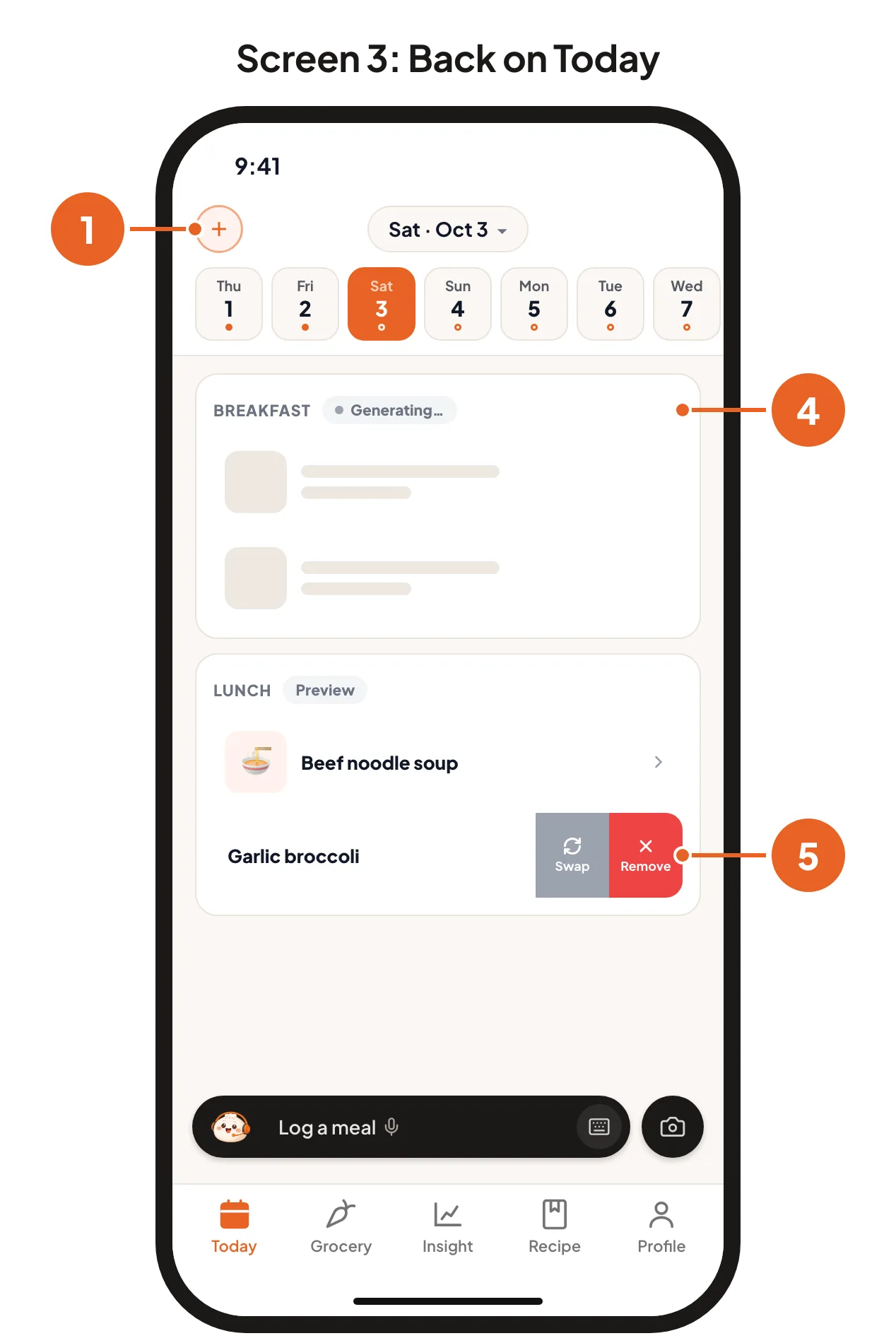
Start a plan. On the Today page, tap the + button at the top left.
Answer a few questions. Baobao asks which dates to plan (up to 7 days), who is eating, any ingredients you want to use, how much time you have to cook, and anything else it should know.
Check the draft. You see the meals for each day. Add or remove meals, then tap Generate plan.
Wait a moment. The new meals appear on the Today page with a Generating… label, then fill in with recipes.
Change a planned dish. Slide it to the left and tap Swap to pick a different dish, or Remove to take it out.
You can also ask Baobao, for example "plan dinners for this week".
Cooking from a CosMeal recipe
When you cook a dish from your meal plan, the app knows the recipe: every ingredient and its weight. When you log it with the camera, it uses the recipe's numbers instead of guessing from the photo. Tell it how many servings you ate. This is the most accurate way to log home cooking.
Make a grocery list
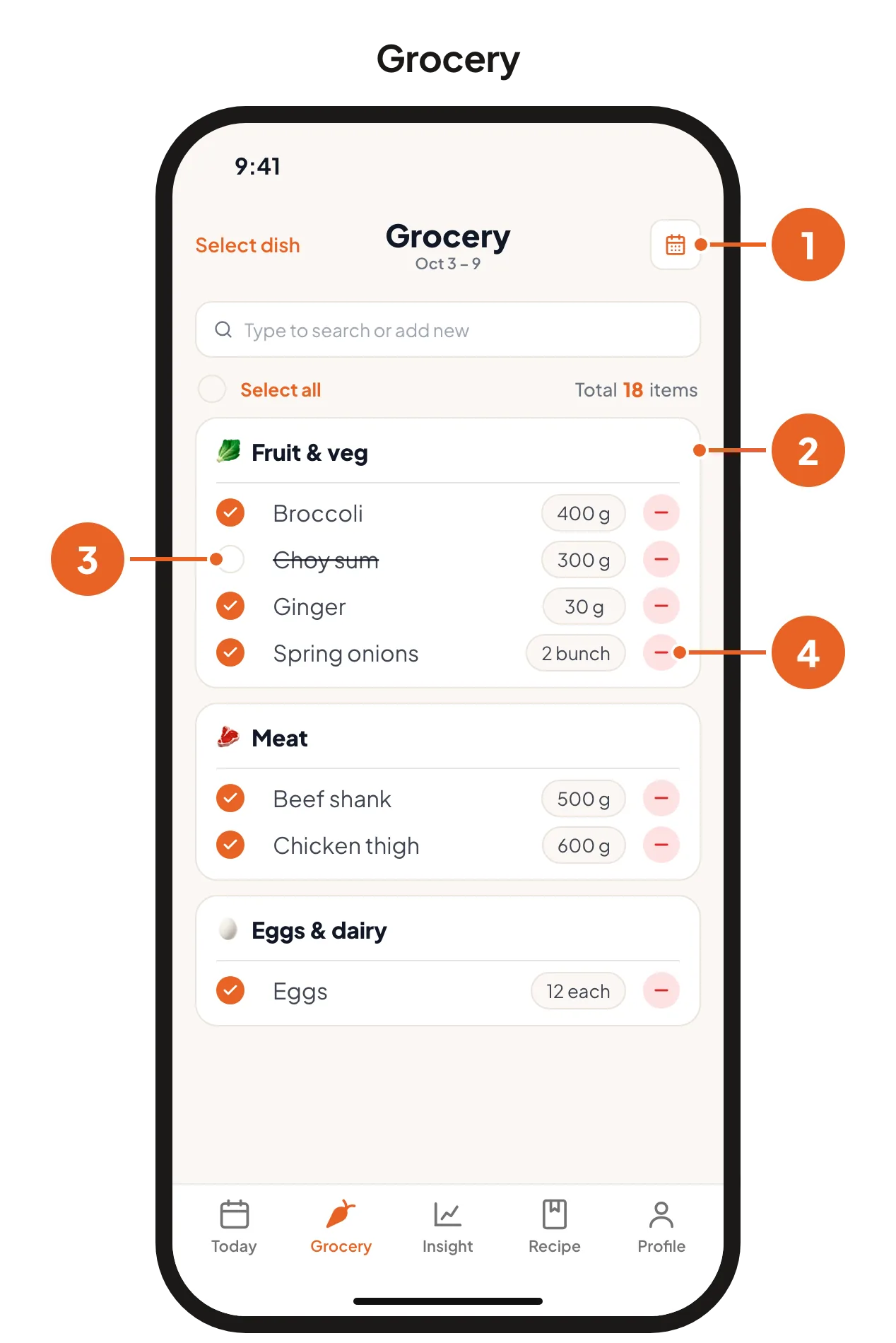
Open the Grocery tab and tap Pick dates. Once you have a list, the calendar button at the top right picks new dates.
Choose the days you want to shop for. The app builds one list from every planned dish on those days, sorted by aisle, with duplicates merged.
Shop. Tap the circle next to an item when it is in your cart. The item is crossed out.
Change an item. Tap its amount to edit it, or tap the red minus to remove it.
See how your week went
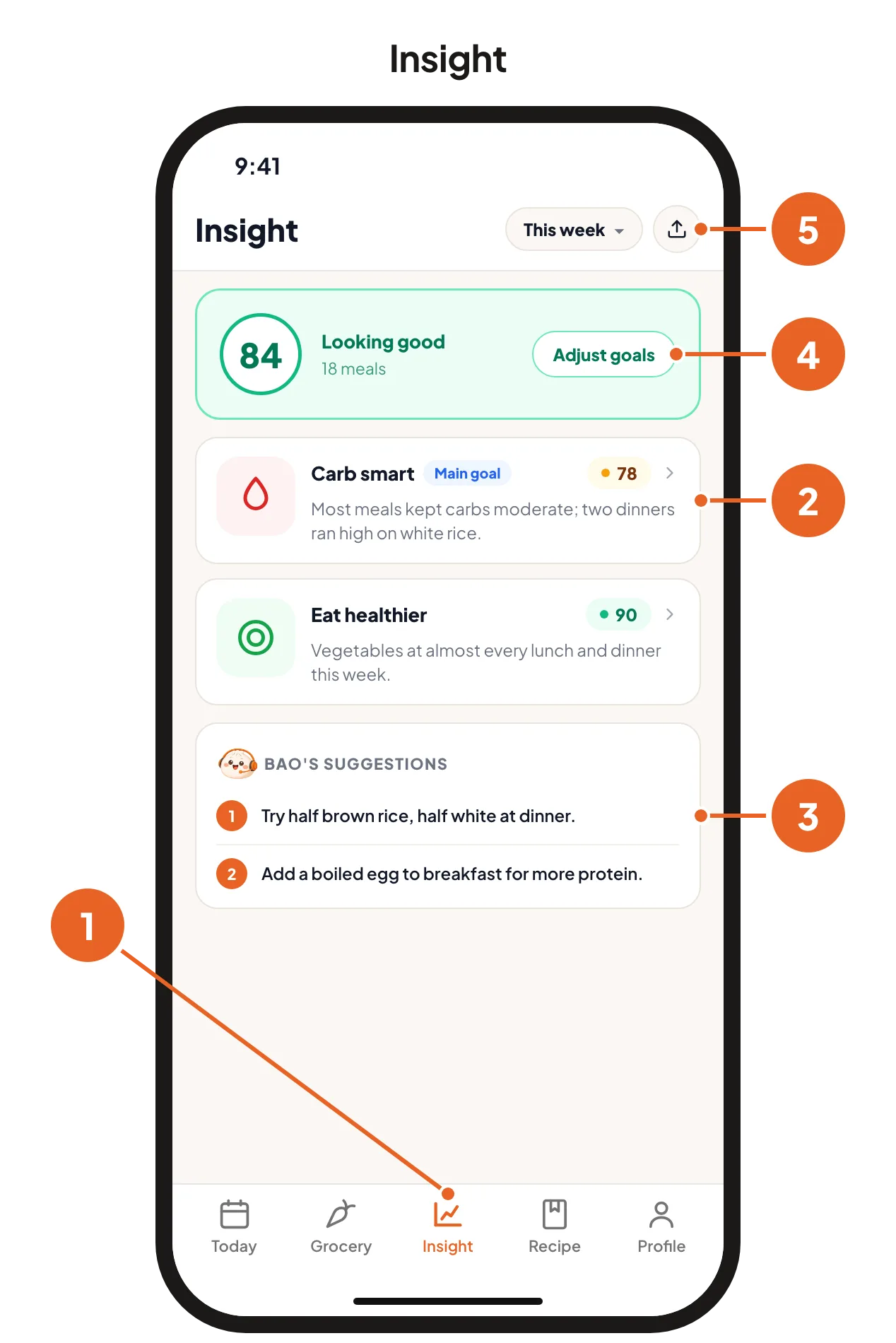
Open the Insight tab. Each week gets a score for each of your goals, based on the meals you logged.
Tap a goal to see what counted and where you landed.
Read Bao's suggestions for small changes to try next week.
Change your goals any time with Adjust goals.
Share the report with your care team. The share button makes a PDF of the whole week.
The more meals you log, the more useful your Insight is.
Important
CosMeal gives estimates, not medical advice. Follow the plan your care team gave you, and ask them how to use these numbers.